

Record lesson attendance
For school managers and teachers with permission to review the lesson.
How to record attendance
Section titled “How to record attendance”-
Open Account > Calendar and select the Classes tab.
-
Find the lesson by date. Under Actions, open Class review.
-
Check the date, then choose Present, Excused Absence or Unexcused Absence under Presence for each student.
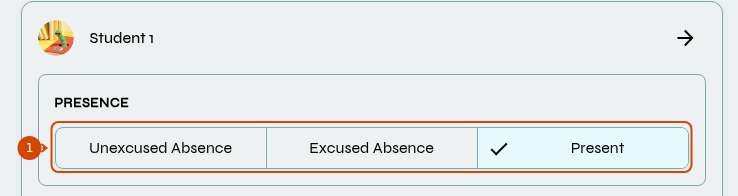
Choose the student’s attendance using the three highlighted options.
-
Select Save. The attendance record is visible to the student.
Canceled lessons
Section titled “Canceled lessons”When Status is Canceled, attendance cannot be edited manually. Cancellation Reason is required and sets attendance automatically:
- Canceled by School/Teacher or Canceled by Student (Early Cancel): Excused Absence.
- Canceled by Student (Late Cancel): Unexcused Absence.
Changing the cancellation or its reason can replace recorded attendance. Do not change the status just to unlock attendance controls.
See also: record homework and write feedback.