

Write lesson feedback
For school managers and teachers with permission to review the lesson.
How to write feedback
Section titled “How to write feedback”-
Open Account > Calendar > Classes and find the lesson by date.
-
Under Actions, select Class review.
-
Use Class summary to summarize the lesson content. Students can see this text.
-
Under the relevant student, use Feedback to Student for feedback they can read.
-
For notes the student cannot see, use Private Teacher Notes, when available. Do not put internal information in the summary or student feedback.
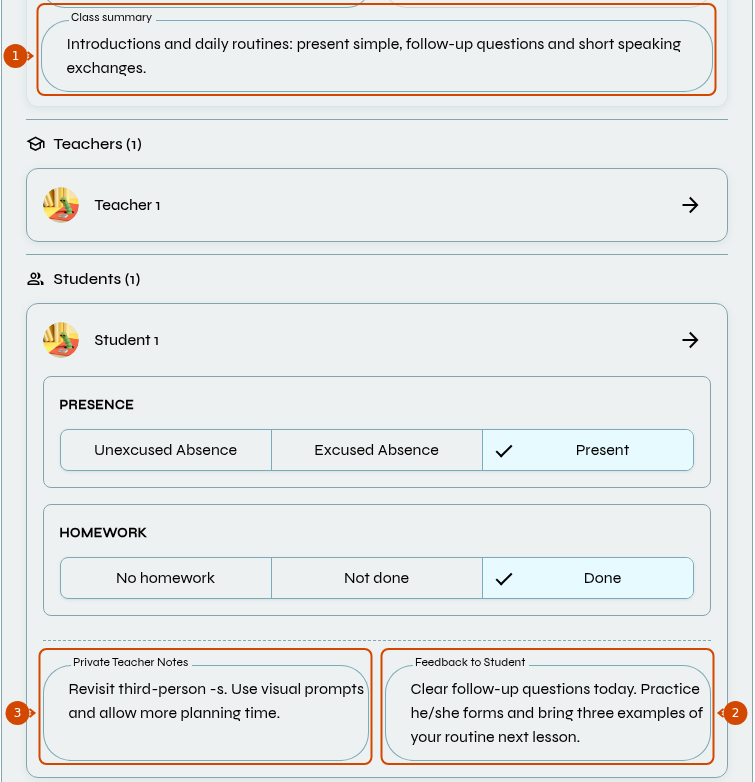
1: summary students can see. 2: student feedback. 3: internal teacher notes.
-
Review the fields and select Save.
If the lesson is canceled, fill in Cancellation Reason to save. Changing the cancellation or its reason also affects attendance: check the rules.
See also: record homework.